

In order to optimize the sound quality of musical instruments while using Zoom, the following device setting changes are
Required for all session participants (both instructors and students) :
1.Restart the Zoom client if it is already running.
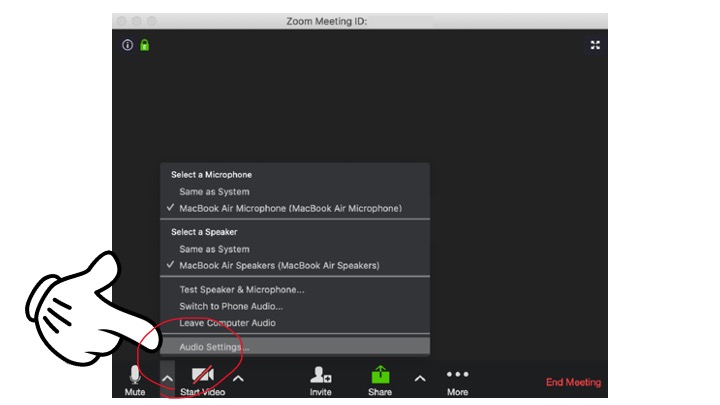
2. Click “Audio settings…”
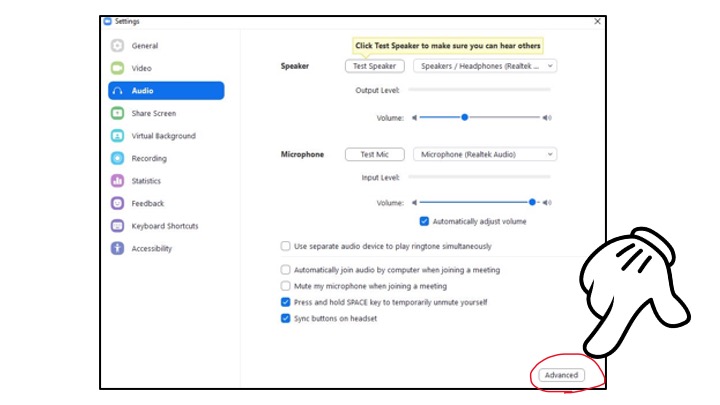
3. Click the ”Advanced” Button.
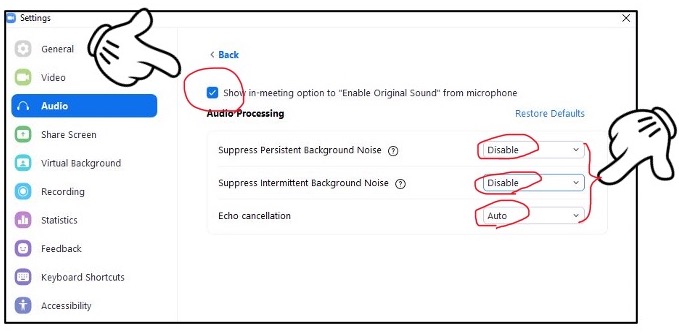
4. Check the box entitled, “Show in-meeting option to “Enable original sound” from microphone.
5. Set ”Suppress Persistent Background Noise” to “Disable”
6. Set “Suppress Intermittent Background Noise” to “Disable”
7. Ensure “Echo Cancellation” is set to “Auto”
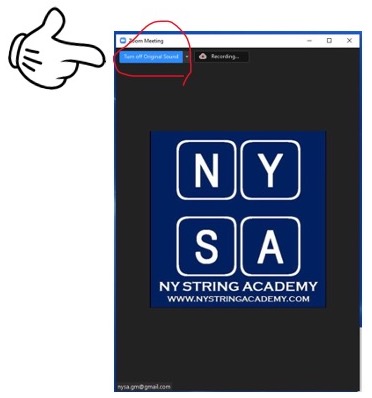
8. Turn on “Original Sound”
Note : these settings are only available on Mac or Windows computer/device. You will only make these changes once for each computer/device. Finally, ensure you point the microphone at the instrument to further increase the audio quality.